
Training an AI model is the process of teaching a computer system to recognize patterns in data so it can make predictions or decisions without being explicitly programmed for each task. To do this effectively, powerful computing resources are essential because models must process massive datasets and perform complex mathematical calculations millions of times. Cloud GPU Servers have emerged as a practical solution that provides this high-performance computing power on-demand, making AI model training accessible for beginners, startups, and enterprises alike.
Cloud GPU hosting lets you access powerful graphics processing units without investing in expensive hardware, providing scalable cloud infrastructure that adapts to your AI projects’ needs. Whether you’re building image classification systems or natural language processing models, cloud-based GPU servers provide the deep learning infrastructure needed to accelerate your work.
- What Is a Cloud GPU Server?
- Why Use Cloud GPU Servers for AI Model Training?
- GPU vs CPU for AI Model Training
- Step-by-Step Guide to Train AI Models on Cloud GPU Servers
- Common Use Cases of Cloud GPU Servers
- Best Practices for Faster AI Model Training
- Common Mistakes to Avoid
- Why Businesses Are Choosing Cloud GPU Infrastructure
- Train AI Models Faster with VyomCloud
- Conclusion
- Related Reading
- FAQs
- 1. What is a Cloud GPU Server?
- 2. Why are GPUs better than CPUs for AI model training?
- 3. How much does Cloud GPU Hosting cost?
- 4. Which frameworks work best on GPU servers?
- 5. Can beginners use Cloud GPU Servers?
- 6. What are the benefits of GPU Hosting?
- 7. How do I choose the right GPU Server?
- 8. Is Cloud GPU Hosting suitable for business applications?
What Is a Cloud GPU Server?
A Cloud GPU Server is a remote computing machine that includes specialized graphics processing units (GPUs) designed for parallel processing tasks. Unlike standard servers that rely primarily on central processing units (CPUs), GPU servers leverage thousands of smaller cores that can handle multiple calculations simultaneously.
GPU servers work by distributing computational tasks across their many cores. When you train an AI model, the server breaks down large datasets into smaller chunks and processes them in parallel, dramatically reducing training time. This parallel computing capability is what makes GPU-powered servers so effective for data science workloads.
GPUs excel at AI because these workloads involve massive matrix operations and repetitive calculations. The parallel architecture of GPUs allows them to process thousands of mathematical operations at once, making them ideal for training deep learning models and handling high-performance computing tasks that would take CPUs days to complete.
Why Use Cloud GPU Servers for AI Model Training?
Using cloud GPU servers for AI model training offers several compelling advantages that make them the preferred choice for modern development teams.
GPU cloud hosting provides significantly faster processing speeds compared to traditional CPU servers. Models can train in hours instead of days, enabling rapid iteration and experimentation with different approaches.
Scalable cloud infrastructure allows you to easily adjust your computing resources based on project needs. You can start with a single GPU server and scale up to multiple GPUs as your AI projects grow.
Cloud computing services eliminate the need for expensive hardware investments. You pay only for the resources you use, making enterprise cloud solutions accessible to startups and businesses without large capital budgets.
GPU cloud hosting provides on-demand access to computing power. You can deploy resources instantly when needed and release them when your training is complete, optimizing resource management.
High-performance computing with GPUs delivers superior performance when processing large datasets. The parallel architecture handles massive data volumes efficiently, making cloud-based GPU servers ideal for complex AI models.
GPU vs CPU for AI Model Training
Understanding the differences between GPU and CPU for AI model training helps you make informed decisions about your deep learning infrastructure. GPU computing outperforms CPU for AI workloads because of its parallel architecture, making GPU hosting the standard for training modern models.
| Aspect | GPU | CPU |
| Processing Power | Thousands of cores for parallel processing | Fewer cores optimized for sequential tasks |
| Training Speed | 10-100x faster for most models | Slower, especially for large datasets |
| Parallel Computing | Excellent – handles thousands of operations simultaneously | Limited – focuses on sequential processing |
| Cost | Higher per unit but more efficient overall | Lower per unit but less efficient |
| Suitable Workloads | AI, deep learning, data analytics | General computing, web services, databases |
Prerequisites Before Training an AI Model
Before you begin training your AI model on cloud GPU servers, ensure you have the following prerequisites in place.
Prepare your dataset by cleaning, organizing, and formatting it properly. Ensure data is labeled correctly for supervised learning tasks and split into training, validation, and test sets. Set up a Python environment with the necessary version (typically Python 3.7 or higher). Use package managers like pip or conda to manage dependencies.
Install TensorFlow, a popular framework for AI that provides comprehensive tools for building and training models on GPU-powered servers. Consider PyTorch as an alternative framework, especially popular for deep learning infrastructure and research workloads due to its dynamic computation graph.
Ensure adequate storage space for your dataset, model checkpoints, and training logs. Cloud computing services typically offer scalable storage options. Obtain access credentials for your chosen cloud GPU server provider. This includes SSH keys, API credentials, and login information for secure connection.
Step-by-Step Guide to Train AI Models on Cloud GPU Servers
Follow this comprehensive guide to successfully train AI models on cloud GPU servers.
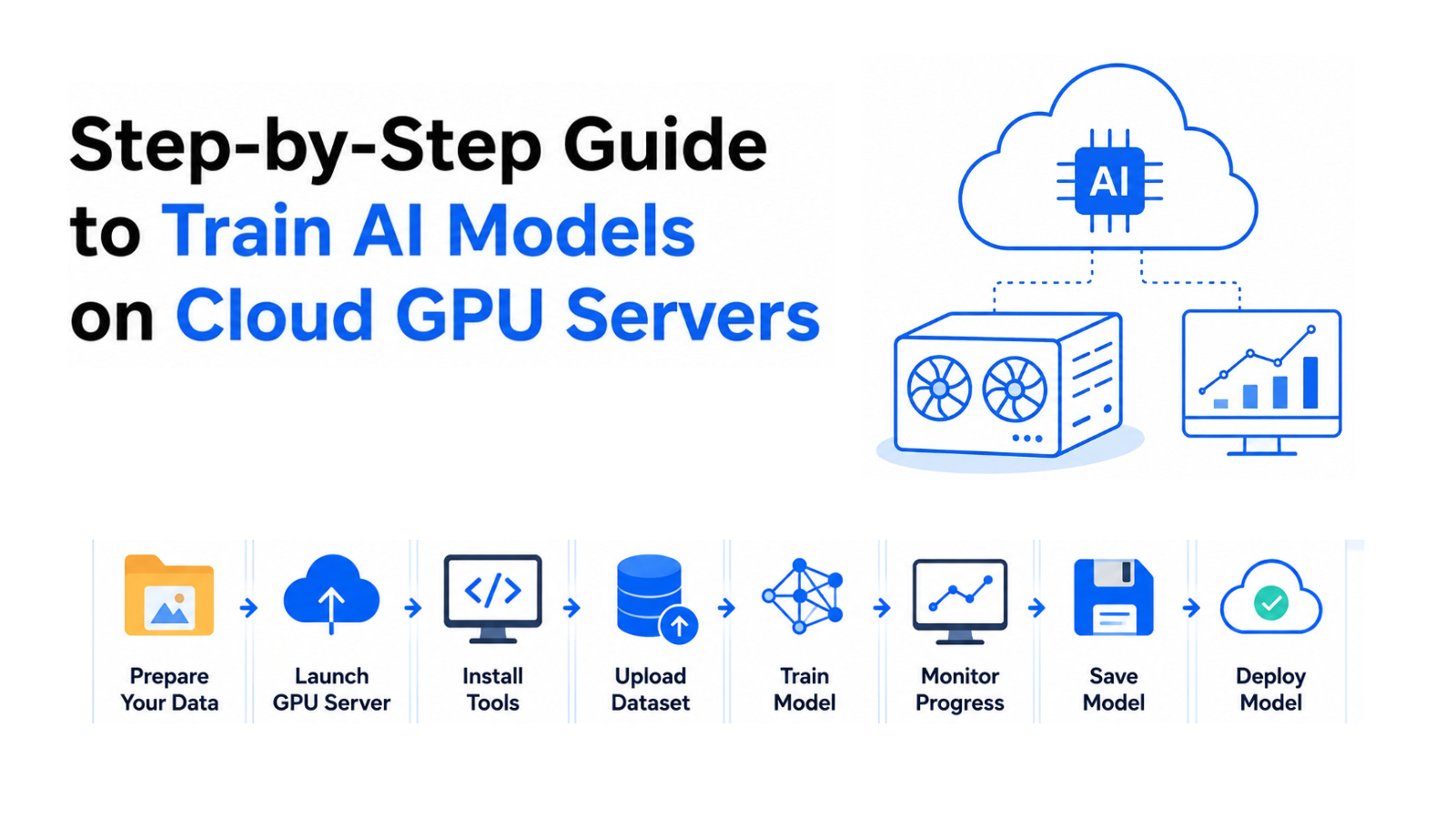
Select a cloud GPU server that matches your project requirements. Consider factors like GPU type (NVIDIA V100, A100, etc.), number of cores, memory capacity, and network speed. For enterprise applications, prioritize providers with security certifications and compliance standards.
Set up your server environment by installing necessary system packages, configuring network settings, and setting up security measures. Enable firewalls, configure SSH access, and ensure proper authentication mechanisms for enterprise cloud solutions.
Transfer your prepared dataset to the cloud server using secure file transfer protocols. Use tools like SCP, SFTP, or cloud provider-specific upload methods. Ensure data integrity during transfer and organize files in logical directories.
Install AI frameworks like TensorFlow or PyTorch along with their GPU-compatible versions. Use package managers to install CUDA libraries and GPU drivers required for deep learning infrastructure.
Develop your AI model using your chosen framework. Write code to define the model architecture, load your dataset, and initiate training. Monitor the training process to ensure it proceeds correctly.
Use monitoring tools to track GPU utilization, training speed, and model metrics. Monitor memory usage, processing times, and convergence rates to optimize performance and identify potential issues.
Save your trained model with proper checkpointing to prevent data loss. Deploy the model to production environments or testing platforms. Ensure version control and maintain documentation for future updates.
Common Use Cases of Cloud GPU Servers
Cloud GPU servers support a wide range of applications across different industries and use cases. Train models to identify and categorize images automatically, useful for content moderation, medical imaging analysis, and visual search systems. Build models for text analysis, sentiment detection, language translation, and question-answering systems that understand human language.
Create personalized recommendation engines for e-commerce, streaming platforms, and content delivery that adapt to user preferences. Develop models that forecast future trends based on historical data for finance, weather prediction, and business planning. Build advanced systems for object detection, facial recognition, autonomous vehicles, and industrial quality control.
Best Practices for Faster AI Model Training
Implement these best practices to optimize your AI model training performance on cloud GPU servers. Preprocess and optimize your data before training. Remove noise, normalize values, and reduce dimensionality to improve training efficiency. Use batch processing to handle data in manageable chunks rather than processing entire datasets at once. This reduces memory pressure and improves throughput.
Implement regular checkpointing to save model states during training. This prevents loss of progress if training fails and allows you to resume from the last checkpoint. Continuously monitor GPU utilization to ensure resources are being used efficiently. Adjust batch sizes and model complexity based on utilization metrics. Manage resources effectively by scaling up or down based on training needs. Use cloud computing services that offer flexible resource allocation.
Common Mistakes to Avoid
Avoid these common pitfalls to ensure successful AI model training on cloud GPU servers. Don’t underestimate the GPU power needed for your models. Insufficient resources lead to slow training and poor model performance. Avoid training with unprepared or poorly organized datasets. This leads to inaccurate models and wasted computational resources.
Don’t skip monitoring during training. Without monitoring, you won’t detect issues early or optimize performance effectively. Failure to back up trained models can result in losing valuable work. Always implement proper checkpointing and version control. Avoid training models beyond the point of optimal performance. Overtraining leads to models that perform well on training data but poorly on new data.
Why Businesses Are Choosing Cloud GPU Infrastructure
Businesses worldwide are increasingly adopting cloud GPU infrastructure for their AI and data analytics needs. Scalable cloud infrastructure provides the flexibility to adjust resources based on project demands, allowing businesses to respond quickly to changing requirements. GPU-powered servers deliver superior performance for complex computations, enabling faster training times and more accurate models.
Cloud computing services eliminate hardware investments and reduce operational costs, making enterprise cloud solutions economically attractive. Cloud GPU hosting offers seamless scalability, allowing businesses to start small and expand resources as their AI projects grow.
Train AI Models Faster with VyomCloud
VyomCloud provides high-performance cloud GPU servers designed specifically for AI and deep learning workloads. Their enterprise-grade infrastructure ensures reliable network connectivity and scalable resources that adapt to your project needs.
VyomCloud’s GPU cloud hosting platform supports a wide range of applications, including AI model training, deep learning infrastructure, data analytics, and research projects. The platform offers secure, compliant solutions suitable for enterprise applications with strict security requirements.
With VyomCloud, you get access to GPU-powered servers with cutting-edge NVIDIA technology, optimized for high-performance computing tasks. Their cloud-based GPU servers provide the flexibility and performance needed for modern AI projects, making advanced computing accessible to businesses of all sizes.
Conclusion
Training AI models on cloud GPU servers offers unparalleled advantages in speed, scalability, and cost efficiency. By leveraging GPU hosting and cloud computing services, beginners can access powerful computing resources without expensive hardware investments, startups can scale resources as needed, and enterprises can maintain security and compliance standards.
Follow the step-by-step guide, implement best practices, and avoid common mistakes to successfully train your AI models. Choose the right cloud GPU infrastructure like VyomCloud that matches your project requirements, and accelerate your AI projects with the power of GPU computing.
Related Reading
What is Paperclip? Complete Beginner Guide 2026
Paperclip App Review: Features, Benefits & Use Cases (2026)
Also Read: How to Build Automation Workflows Using n8n
Let’s Get Social:
Facebook: https://www.facebook.com/vyomcloudnetwork/
LinkedIn: https://www.linkedin.com/company/vyomcloud/
Instagram: https://www.instagram.com/vyomcloud/
FAQs
1. What is a Cloud GPU Server?
A Cloud GPU Server is a remote computing machine that includes specialized graphics processing units for parallel processing, ideal for AI model training and deep learning infrastructure.
2. Why are GPUs better than CPUs for AI model training?
GPUs have thousands of cores that handle parallel computing, making them 10-100x faster than CPUs for AI workloads involving massive matrix operations.
3. How much does Cloud GPU Hosting cost?
Cloud GPU hosting costs vary based on provider, GPU type, and usage duration. Most providers offer pay-as-you-go models without large capital investments.
4. Which frameworks work best on GPU servers?
TensorFlow and PyTorch are the most popular frameworks that work excellently on GPU-powered servers with GPU-compatible versions.
5. Can beginners use Cloud GPU Servers?
Yes, beginners can use cloud-based GPU servers through user-friendly platforms that provide simple setup processes and comprehensive documentation.
6. What are the benefits of GPU Hosting?
GPU hosting offers faster training speeds, scalability, cost efficiency, on-demand resources, and better performance for large datasets.
7. How do I choose the right GPU Server?
Choose based on GPU type, memory capacity, number of cores, network speed, and provider reliability. Consider your specific AI project requirements.
8. Is Cloud GPU Hosting suitable for business applications?
Yes, cloud GPU hosting is ideal for business applications, offering enterprise cloud solutions with security, compliance, reliability, and scalability for data science workloads.
